
Specifications



Removal and replacement procedures 68
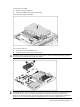
To apply the thermal grease compound:
1. Use a clean cloth dipped in rubbing alcohol to clean the contact surface on the heat sink and the
new processor. Wipe the contact surfaces several times to make sure that no particles or dust
contaminants are evident.
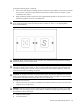
2. Apply the thermal grease compound to the integrated heat spreader on the processor in one of
the following patterns to ensure even distribution.
CAUTION: HP recommends using Shin-Etsu X-23-7783D thermal grease compound for your ProLiant
server. Apply the grease to the top of the processor in either a 5 “Dot” or “S” shaped pattern.
Ensure even distribution.
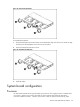
Figure 41 The Top of the Processor
CAUTION: Never touch the bottom of the processor; any contaminant could prevent the mounting
pads from making contact with the socket.
CAUTION: Applying too much grease creates a gap between the contact surfaces, significantly
reducing the ability of the heat sink to draw out heat. Installing the heat sink with excessive grease
can also cause the grease to spread over the processor pins or the system board base, which can
cause electrical shorts that damage the system.
CAUTION: To install the processor into the processor socket, the processor installation tool must be
used to prevent damage to the pins. The processor installation tool is provided in the system board
and processor spare part kits with instructions on how to use the tool.
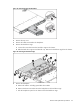
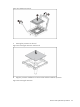
To install the new processor:
1. Insert the processor into processor installation tool and then insert the processor into the socket,
using the key on the processor.
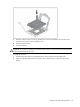
CAUTION: With the load lever and the retention plate disengaged, hold the processor by its edges
and align it over the empty processor socket. Make sure that you properly align the processor with
the orientation notch on the socket.
2. Close the retention plate.
3. Lock the load lever.