
Specifications






Removal and replacement procedures 53
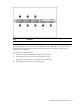
Item Description
1-8 SAS/SATA hard drives 1-8
The hot-plug HDD for the servers with 2 3.5” HDDs and 4 3.5” HDDs and 8 2.5” HDDs share the
same removal and replacement procedures. Here we take the server with 4 3.5” HDDs as an
example for your reference.
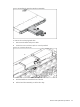
To remove the hot-plug hard drive:
1. Press the hard disk carrier button to release the ejector lever.
2. Use the HDD carrier latch to pull the drive out of the cage.
Make sure to support the drive when pulling it out of the cage.
3. Pull the hard drive assembly out of the drive bay.