
Specifications




Diagnostic tools and setup utilities 119
Boot menu
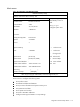
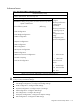
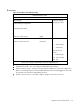
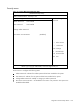
Figure 110 Boot Menu of the BIOS Setup Utility
ROM-based Setup Utility
Main Advanced <Boot> Security Exit
Boot Settings Configure Settings
during System Boot.
Boot Settings Configuration
Standard Boot Order
USB Device Boot Priority [High]
Restore on AC Power Loss
[Last State]
←→ Select Screen
↑↓ Select Item
Enter Go to Sub
Screen
F1 General Help
F10 Save and Exit
ESC Exit
V02.61 (C) Copyright 1985-2006, American Megatrends, Inc.
• Boot Settings Configuration— Configure settings during system boot.
• Standard Boot Order—View and configure standard boot order settings.
• USB Device Boot Priority— Configure priority settings for USB devices. Users can configure the
BIOS to avoid attempting to boot non-bootable USB devices that are left plugged into the server
during POST. The options are High (default) and Low.
• Restore on AC Power Loss—View and configure settings to restore AC power loss.