
User's Manual


5–14 Hardware and Software Guide
Wireless (Select Models Only)
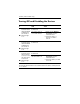
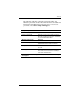
Turning Off and Disabling the Devices
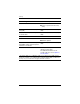
If And Then
■ Wireless
Assistant shows
that both WLAN
and Bluetooth
are turned on
■ Wireless light
is
on
You want to disable
both devices
Press the wireless button.
You want to turn off
one or both devices
1. Right-click the Wireless
Assistant icon in the
notification area.
2. Select the device or
devices you want to
turn
off.
■ Wireless
Assistant shows
that both WLAN
and Bluetooth
are turned off
■ Wireless light
is
off
You want to disable
both devices
Press the wireless button.
■ Wireless
Assistant shows
that one device
is turned on and
the other device
is turned off
■ Wireless light
is
on
You want to disable
both devices
Press the wireless button.*
You want to turn off
the device that is on
1. Right-click the Wireless
Assistant icon in the
notification area.
2. Select the device you want
to turn
off.
*If the wireless devices are not both turned on when you disabled them,
pressing the wireless button a second time returns the devices to their previous
on or off state.