
User manual




Etherboot User Manual
(e.g. using ’make rtl8139.com’) can provide a useful remedy. Those DOS
Executables are comparable in their functionality to .rom images and
can be used as substitutes.
In case an existing DOS-bootsector, stored in BOOTSECT.DOS, cannot be
used, creating one has to be done by formatting and installing a harddrive
using DOS before installing NT (see Win-NT Multiboot-HOWTO). In addition
the DOS system files are needed (IO.SYS, MSDOS.SYS, or KERNEL.SYS
when using FreeDOS) and have to be copied into the directory of the
NT loader. If using Autoexec.bat to start the .COM file is desired,
either the particular COMMAND.COM has to be provided or the etherboot
file needs to be renamed as COMMAND.COM. This file will then be started
instead of the DOS-Shell which is useful for avoiding unwanted user
interaction. Afterwards a line has to be added to BOOT.INI as if DOS
was to be booted:
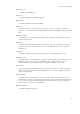
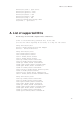
[boot loader]
timeout=20
default=C:\bootsect.dos #add this line if dhcp/tftp should be default action
[operating systems]
multi(0)disk(0)rdisk(0)partition(2)\WINNT="Windows NT Workstation, Version 4.0"
[VGA-Modus]" /basevideo /sos
C:\bootsect.dos="DHCP/TFTP (Linux diskless via etherboot)" #our boot option
And here are some comments by Rapp Informatik Systeme GmbH about cbrom.exe versions:
Some more remarks for cbrom..
There are several version numbers of cbrom.exe p.e. 1.x and 2.x.
and there is a cbrom called cbrom6.exe. First cbrom.exe with Version
1.x (newest 1.32) is for Award Bios Version 4.5x and cbrom6.exe is
for Award Bios Version 6.xx.
So because it seems a lot people become confused and use cbrom 1.x
for the new 6.x Bios Award merged this together to a cbrom.exe with
Version number 2.x ( newest know 2.04) witch now runs on Award 4.5x and
6.xx Bioses.
Now how to find cbrom.exe. Different 1.x Versions of cbrom.exe
could be found on the net, cbrom6.exe seems to be gone. It seems
that Award/Phoenix do all that cbrom is deleted from servers of board
manufactures. So cbrom.exe Vers 2.04 is not available on the net.
If somebody need this please try to send a demand question to the list -
I hope somebody will mail it to you.
2. How do I enable the ROM socket on my network adapter? There are no jumpers on the card.
These jumperless cards need a card-specific utility program to enable the ROM. Normally the
manufacturer supplies it on a diskette or CDROM. You lost the diskette? If you know the
manufacturer, you might be able to get the program from their website. You have a mystery card?
Well the first thing to do is to identify the card. If it is an ISA card and made in Taiwan or China it’s
22