
User guide




. . . . . . . . . . . . . . . . . . . . . . . . . . . . .
1-3
Compaq Netelligent 1016 10Base-T Unmanaged Repeater User Guide
Writer: Liz Fischer Project: Overview Comments: 268749-001
File Name:749_1.doc Last Saved On:6/19/96 10:46 AM
LED Indicators
The repeater contains PWR, ACT, COL, and MEP LEDs that show the
repeater's power status (ON or OFF), the incoming traffic on the repeater
(heavy, light, or no activity), and the collision status (light or heavy activity).
Each RJ-45 port has a Link Status LED that operates in the following manner:
■
When you power up the repeater, the Link Status LEDs are ON
momentarily, then turn OFF.
■
When the repeater connects with either a powered network station or
another repeater, the LED associated with that port is ON and remains
ON until the connection breaks.
■
If the repeater makes no connection, the LED is OFF.
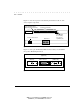
Figure 1-3 shows the locations of the LEDs and the RJ-45 ports on the front
panel of the repeater.
PWR
ACT
COL
MEP
1
9
2
10
3
11
4
12
5
13
6
14
7
15
8
16
Power, Activity, Collision,
Media Expansion Port Activity LEDs
RJ-45 Ports
Link Status LEDs
Figure 1-4. Location of the LEDs