
User guide




. . . . . . . . . . . . . . . . . . . . . . . . . . . . . .
1-4 Overview
Writer: Liz Fischer Project: Overview Comments: 268749-001
File Name:749_1.doc Last Saved On:6/19/96 10:46 AM
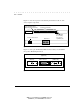
Table 1-1 describes the repeater LEDs:
Table 1-1
LED Indicators
LED Flashing
Yellow
Green Flashing
Green
LED
OFF
PWR
Not used Power ON; normal
operations
Not used Power OFF
ACT
Not used Heavy activity (incoming
traffic) on the port
Light activity
(incoming traffic) on
the port
No activity (no
incoming traffic on
port)
COL
* Not used Not used No collisions
* Slow flashing = Light collisions; Fast flashing = Heavy collisions
Link Status
(RJ-45
Port)
Not used Link OK for the RJ-45
port
Not used Link failed or no
connection for the
RJ-45 port
NOTE: Flashing Yellow LEDs may appear orange on the repeater’s front panel.