
Personal Computer Reference Guide
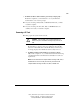
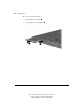
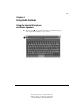
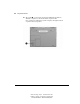
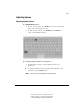
Table Of Contents
- Notice
- Contents
- About This Guide
- Getting Started
- Taking a Look at the Computer
- Using the Keyboard
- Managing Power
- Upgrading Your Computer
- Mobile Expansion Unit (available on select models)
- Using an Internal Modem (available on select models
- Using PC Cards
- Using Audio Features
- Using the Infrared Port
- Securing the Computer
- Intelligent Manageability
- Maintenance, Shipping, and and Travel
- Configuration and Diagnostic Utilities
- Troubleshooting
- Compaq Customer Support
- Regulatory Notices
- Electrostatic Discharge
- Specifications
- Index

9-5
Writer: Carey Gregg Project: Comments: 113733-001
File Name: J-CH09.doc Last Saved On: 4/1/99 10:24 AM
COMPAQ CONFIDENTIAL - NEED TO KNOW REQUIRED
Adjusting Volume
Adjusting System Volume
■ Using the Fn+F5 hotkeys—
❏ To raise or lower volume, press Fn+F5, then move the onscreen slide
button or press a keyboard arrow key.
❏ To mute or restore volume, press Fn+F5+M or press Fn+F5, then
select or clear the Mute check box.
■ Using the Windows Volume Control window—
❏ Double-click the volume icon in the taskbar, then enter your
preferences.
To activate the Windows Volume Control window while it is open
but inactive, press the Fn+F5 hotkeys.
NOTE: Volume can also be adjusted within some applications.