
Personal Computer Reference Guide
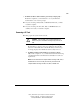
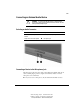
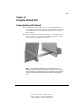
Table Of Contents
- Notice
- Contents
- About This Guide
- Getting Started
- Taking a Look at the Computer
- Using the Keyboard
- Managing Power
- Upgrading Your Computer
- Mobile Expansion Unit (available on select models)
- Using an Internal Modem (available on select models
- Using PC Cards
- Using Audio Features
- Using the Infrared Port
- Securing the Computer
- Intelligent Manageability
- Maintenance, Shipping, and and Travel
- Configuration and Diagnostic Utilities
- Troubleshooting
- Compaq Customer Support
- Regulatory Notices
- Electrostatic Discharge
- Specifications
- Index

9-3
Writer: Carey Gregg Project: Comments: 113733-001
File Name: J-CH09.doc Last Saved On: 4/1/99 10:24 AM
COMPAQ CONFIDENTIAL - NEED TO KNOW REQUIRED
Connecting an External Audio Device
CAUTION: To prevent possible damage to an external device,
do not plug a single-sound channel (monaural) connector into the
stereo speaker/headphone jack.
Selecting an Audio Connector
To Connect This Device Use This Jack
Stereo speakers, headphones, or
headset
Stereo speaker/headphone jack
Single sound channel microphone Microphone jack
Connecting a Device to the Microphone Jack
The microphone jack supports a single sound channel (monaural) microphone
with a 3.5-mm plug. A powered, single sound channel, electret condenser
microphone is recommended.
■ If you use a stereo microphone, only the left channel will be recorded.