
Personal Computer Reference Guide
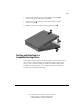
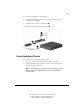
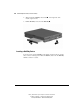
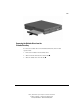
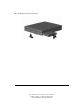
Table Of Contents
- Notice
- Contents
- About This Guide
- Getting Started
- Taking a Look at the Computer
- Using the Keyboard
- Managing Power
- Upgrading Your Computer
- Mobile Expansion Unit (available on select models)
- Using an Internal Modem (available on select models
- Using PC Cards
- Using Audio Features
- Using the Infrared Port
- Securing the Computer
- Intelligent Manageability
- Maintenance, Shipping, and and Travel
- Configuration and Diagnostic Utilities
- Troubleshooting
- Compaq Customer Support
- Regulatory Notices
- Electrostatic Discharge
- Specifications
- Index

6-3
Writer: J Abercrombie Project: Chapter 6 Comments: 113733-001
File Name: G-CH06.doc Last Saved On: 5/18/99 2:49 PM
COMPAQ CONFIDENTIAL - NEED TO KNOW REQUIRED
2. On the mobile expansion unit, press the docking release button ➊ to
release the expansion unit from the computer ➋.
3. Lift the rear end of the computer to disconnect it from the computer
expansion connector
.
4. Pull the computer away from the mobile expansion unit tabs
.
Docking and Undocking to a
Compatible Docking Device
Your computer must be attached to the mobile expansion unit before the system
can be docked to another docking device. Docking the system to the docking
device provides a permanent desktop workstation. Consult the docking device
installation and operations guide or your Compaq authorized dealer for more
information about docking and undocking.