
Personal Computer Reference Guide
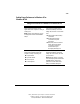
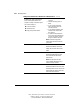
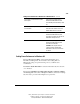
Table Of Contents
- Notice
- Contents
- About This Guide
- Getting Started
- Taking a Look at the Computer
- Using the Keyboard
- Managing Power
- Upgrading Your Computer
- Mobile Expansion Unit (available on select models)
- Using an Internal Modem (available on select models
- Using PC Cards
- Using Audio Features
- Using the Infrared Port
- Securing the Computer
- Intelligent Manageability
- Maintenance, Shipping, and and Travel
- Configuration and Diagnostic Utilities
- Troubleshooting
- Compaq Customer Support
- Regulatory Notices
- Electrostatic Discharge
- Specifications
- Index

4-19
Writer: J Abercrombie Project: Chapter 4 Comments: 113733-001
File Name: E-CH04.doc Last Saved On: 5/18/99 2:44 PM
COMPAQ CONFIDENTIAL - NEED TO KNOW REQUIRED
Setting Power Preferences in Windows 95 or
Windows NT 4.0
Setting Power Preferences in Windows 95 or Windows NT 4.0
Preferences Procedure from Control Panel
Select a preset level of power use that
applies whenever the computer is running on
a battery pack.
NOTE: A battery conservation level can also
be displayed and selected with the Fn+F7
hotkeys.
Select Power (or Compaq Power in
Windows NT)ÅBattery Conservation
Settings tab, then select a conservation
level:
■ High provides maximum battery
conservation.
■ Medium balances battery
conservation and system
performance.
■ None (drain) results in maximum
battery drain because battery
conservation is turned off.
Recommended only for
discharging the battery pack.
Create a level of power use that applies
settings for the following whenever the
computer is running on a battery pack:
■ Suspend timeout
■ System idle timeout
■ Processor speed
■ Screen brightness
Select Power (or Compaq Power in
Windows NT)ÅBattery Conservation
Settings tab. Select Custom, then enter
your preferences.
NOTE: Although a battery conservation
level can be displayed and selected with
the Fn+F7 hotkeys, Custom level
preferences must be entered on the
Battery Conservation Settings tab.
Continued