
Personal Computer Reference Guide
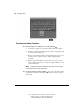
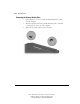
Table Of Contents
- Notice
- Contents
- About This Guide
- Getting Started
- Taking a Look at the Computer
- Using the Keyboard
- Managing Power
- Upgrading Your Computer
- Mobile Expansion Unit (available on select models)
- Using an Internal Modem (available on select models
- Using PC Cards
- Using Audio Features
- Using the Infrared Port
- Securing the Computer
- Intelligent Manageability
- Maintenance, Shipping, and and Travel
- Configuration and Diagnostic Utilities
- Troubleshooting
- Compaq Customer Support
- Regulatory Notices
- Electrostatic Discharge
- Specifications
- Index

4-14 Managing Power
Writer: J Abercrombie Project: Chapter 4 Comments: 113733-001
File Name: E-CH04.doc Last Saved On: 5/18/99 2:44 PM
COMPAQ CONFIDENTIAL - NEED TO KNOW REQUIRED
Removing the Primary Battery Pack
1. If the computer is on, save your work and initiate Hibernation or shut
down the computer.
2. Turn the computer bottom side up and tilt the battery pack so it lies flat
(covering all ports on the rear of the computer).
3. Slide in the two battery latches toward each other.