
Personal Computer Reference Guide
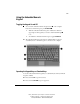
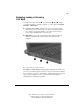
Table Of Contents
- Notice
- Contents
- About This Guide
- Getting Started
- Taking a Look at the Computer
- Using the Keyboard
- Managing Power
- Upgrading Your Computer
- Mobile Expansion Unit (available on select models)
- Using an Internal Modem (available on select models
- Using PC Cards
- Using Audio Features
- Using the Infrared Port
- Securing the Computer
- Intelligent Manageability
- Maintenance, Shipping, and and Travel
- Configuration and Diagnostic Utilities
- Troubleshooting
- Compaq Customer Support
- Regulatory Notices
- Electrostatic Discharge
- Specifications
- Index

4-3
Writer: J Abercrombie Project: Chapter 4 Comments: 113733-001
File Name: E-CH04.doc Last Saved On: 5/18/99 2:44 PM
COMPAQ CONFIDENTIAL - NEED TO KNOW REQUIRED
Beginning, Leaving, or Resuming
Your Work
You will observe the power button , Suspend button , Fn key , and the
power/suspend light as you turn the computer on or off or place it in Suspend
(Standby) or Hibernation.
■ Suspend, called Standby in Windows 98, is an energy-saving feature
that reduces power to system components that are not being used. When
the computer is in Suspend (Standby), your work is saved in random
access memory (RAM) and the screen is cleared.
■ Hibernation is an energy-saving feature that saves all information in
RAM to a hibernation file on the hard drive, then shuts down the
computer.
If you are leaving your work, consider:
If you plan to resume shortly—Initiating Suspend (Standby) clears the screen,
uses less power than leaving the computer on, and your work returns instantly to
the screen when you press the suspend button. A fully charged battery pack can
support Suspend (Standby) for up to a week, but frequent charging and
discharging may shorten battery pack life.