
Personal Computer Reference Guide
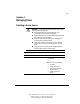
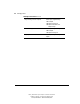
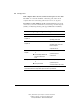
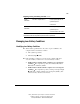
Table Of Contents
- Notice
- Contents
- About This Guide
- Getting Started
- Taking a Look at the Computer
- Using the Keyboard
- Managing Power
- Upgrading Your Computer
- Mobile Expansion Unit (available on select models)
- Using an Internal Modem (available on select models
- Using PC Cards
- Using Audio Features
- Using the Infrared Port
- Securing the Computer
- Intelligent Manageability
- Maintenance, Shipping, and and Travel
- Configuration and Diagnostic Utilities
- Troubleshooting
- Compaq Customer Support
- Regulatory Notices
- Electrostatic Discharge
- Specifications
- Index

4-1
Writer: J Abercrombie Project: Chapter 4 Comments: 113733-001
File Name: E-CH04.doc Last Saved On: 5/18/99 2:44 PM
COMPAQ CONFIDENTIAL - NEED TO KNOW REQUIRED
Chapter 4
Managing Power
Selecting a Power Source
WARNING: To reduce the risk of personal injury, electric shock,
fire, or damage to the equipment:
■ Do not disable the power cord grounding plug. The
grounding plug is an important safety feature.
■ Plug the equipment into a grounded (earthed) electrical outlet
that is easily accessible at all times.
■ Disconnect power from the equipment by unplugging the
power cord from the electrical outlet.
■ Do not place anything on power cords or cables. Arrange
them so that no one may accidentally step on or trip over
them.
■ Do not pull on a cord or cable. When unplugging from the
electrical outlet, grasp the cord by the plug.
Selecting a Power Source
Task Recommended Power Source
Work within installed software applications
■ Charged battery pack inserted into
the computer
or
■ External power supplied through
❏ AC Adapter
❏ Optional docking base
❏ Optional Automobile Power
Adapter/Charger or
❏ Optional Aircraft Power
Adapter
Continued