
Personal Computer Reference Guide
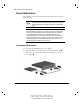
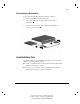
Table Of Contents
- Notice
- Contents
- About This Guide
- Getting Started
- Taking a Look at the Computer
- Using the Keyboard
- Managing Power
- Upgrading Your Computer
- Mobile Expansion Unit (available on select models)
- Using an Internal Modem (available on select models
- Using PC Cards
- Using Audio Features
- Using the Infrared Port
- Securing the Computer
- Intelligent Manageability
- Maintenance, Shipping, and and Travel
- Configuration and Diagnostic Utilities
- Troubleshooting
- Compaq Customer Support
- Regulatory Notices
- Electrostatic Discharge
- Specifications
- Index

2-9
Writer: Carey Gregg Project: Comments: 113733-001
File Name: C-CH02.doc Last Saved On: 4/23/99 10:36 AM
COMPAQ CONFIDENTIAL - NEED TO KNOW REQUIRED
Disconnecting the Diskette Drive
To disconnect the external diskette drive from the computer:
1. Remove the diskette from the diskette drive.
2. Unscrew the small end of the drive cable from the external
diskette drive .
3. Unscrew the large end of the drive cable from the parallel port
on the rear of the computer
.
Versatile Battery Pack
The primary battery pack is a multifunctional feature of the computer. In
addition to providing portable power, it
■ Creates a comfortable tilt for working at the keyboard. Fold the battery
pack back and under the computer.
■ Provides a cover for the rear connectors. Place the battery pack in a
straight position while the computer is lying flat.