
Personal Computer Reference Guide
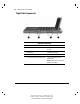
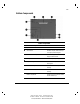
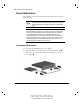
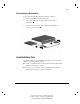
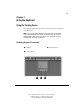
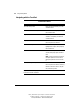
Table Of Contents
- Notice
- Contents
- About This Guide
- Getting Started
- Taking a Look at the Computer
- Using the Keyboard
- Managing Power
- Upgrading Your Computer
- Mobile Expansion Unit (available on select models)
- Using an Internal Modem (available on select models
- Using PC Cards
- Using Audio Features
- Using the Infrared Port
- Securing the Computer
- Intelligent Manageability
- Maintenance, Shipping, and and Travel
- Configuration and Diagnostic Utilities
- Troubleshooting
- Compaq Customer Support
- Regulatory Notices
- Electrostatic Discharge
- Specifications
- Index

2-4 Taking a Look at the Computer
Writer: Carey Gregg Project: Comments: 113733-001
File Name: C-CH02.doc Last Saved On: 4/23/99 10:36 AM
COMPAQ CONFIDENTIAL - NEED TO KNOW REQUIRED
Right Side Components
Right Side Components
Component Function
PC Card slot Supports 32-bit (CardBus) and 16-bit
PC Cards.
Air intake vents Cool internal components.
Air exhaust vents Cool internal components.
RJ-11 jack (internal modem models only) Connects the modem cable to an
internal modem.
NOTE: A modem cable is included with
internal modem models.