
Personal Computer Reference Guide
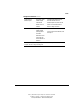
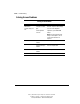
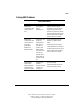
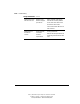
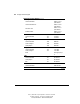
Table Of Contents
- Notice
- Contents
- About This Guide
- Getting Started
- Taking a Look at the Computer
- Using the Keyboard
- Managing Power
- Upgrading Your Computer
- Mobile Expansion Unit (available on select models)
- Using an Internal Modem (available on select models
- Using PC Cards
- Using Audio Features
- Using the Infrared Port
- Securing the Computer
- Intelligent Manageability
- Maintenance, Shipping, and and Travel
- Configuration and Diagnostic Utilities
- Troubleshooting
- Compaq Customer Support
- Regulatory Notices
- Electrostatic Discharge
- Specifications
- Index

15-26 Troubleshooting
Writer: J Abercrombie Project: Chapter 15 Comments: 113733-001
File Name: P-CH15.doc Last Saved On: 5/18/99 3:23 PM
COMPAQ CONFIDENTIAL - NEED TO KNOW REQUIRED
Solving USB Problems
Continued
External devices in the
sixth tier do not work.
Windows 95 and
Windows 98 support
up to five tiers.
Replace some hubs in the first five
tiers with hubs containing additional
sockets, then connect the devices in
the sixth tier to the new hubs.
Connect some external USB devices to
other connectors.
External devices in
lower tiers do
not work.
An unpowered hub
is connected
to another
unpowered hub.
Use only powered hubs.
Make sure that all unpowered hubs are
preceded by powered hubs in the USB
chain.