
Personal Computer Reference Guide
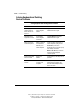
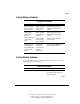
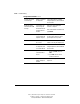
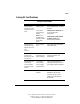
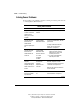
Table Of Contents
- Notice
- Contents
- About This Guide
- Getting Started
- Taking a Look at the Computer
- Using the Keyboard
- Managing Power
- Upgrading Your Computer
- Mobile Expansion Unit (available on select models)
- Using an Internal Modem (available on select models
- Using PC Cards
- Using Audio Features
- Using the Infrared Port
- Securing the Computer
- Intelligent Manageability
- Maintenance, Shipping, and and Travel
- Configuration and Diagnostic Utilities
- Troubleshooting
- Compaq Customer Support
- Regulatory Notices
- Electrostatic Discharge
- Specifications
- Index

15-15
Writer: J Abercrombie Project: Chapter 15 Comments: 113733-001
File Name: P-CH15.doc Last Saved On: 5/18/99 3:23 PM
COMPAQ CONFIDENTIAL - NEED TO KNOW REQUIRED
Solving Memory Problems
Solving Memory Problems
Problem Possible Cause Solution
Memory count during
Power-On Self-Test
(POST) is incorrect.
Memory expansion
board is installed
incorrectly.
Remove, then reinstall memory
expansion board as instructed in
Chapter 5.
Computer beeps
four times when
turned on,
power/suspend light is
on, but screen is
blank.
Memory expansion
board is installed
incorrectly.
Memory expansion
board or memory
circuitry has failed.
Remove, then reinstall memory
expansion board as instructed in
Chapter 5.
Contact your Compaq authorized
service provider.
Hibernation does not
work normally after
increasing RAM with a
memory expansion
board.
The hard drive
does not have
enough space for
the larger
hibernation file.
Refer to “Managing Random Access
Memory (RAM)” in Chapter 5.
Solving Modem Problems
If you are troubleshooting a modem PC Card problem, refer also to “Solving
PC Card Problems” in this chapter.
Solving Modem Problems
Problem Possible Cause Solution
ERROR message. Typing error. If you are typing from the command
line in terminal mode, verify, then
retype the command.
Continued