
Personal Computer Reference Guide
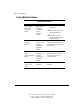
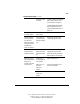
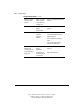
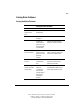

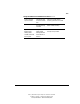
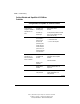
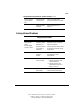
Table Of Contents
- Notice
- Contents
- About This Guide
- Getting Started
- Taking a Look at the Computer
- Using the Keyboard
- Managing Power
- Upgrading Your Computer
- Mobile Expansion Unit (available on select models)
- Using an Internal Modem (available on select models
- Using PC Cards
- Using Audio Features
- Using the Infrared Port
- Securing the Computer
- Intelligent Manageability
- Maintenance, Shipping, and and Travel
- Configuration and Diagnostic Utilities
- Troubleshooting
- Compaq Customer Support
- Regulatory Notices
- Electrostatic Discharge
- Specifications
- Index

15-4 Troubleshooting
Writer: J Abercrombie Project: Chapter 15 Comments: 113733-001
File Name: P-CH15.doc Last Saved On: 5/18/99 3:23 PM
COMPAQ CONFIDENTIAL - NEED TO KNOW REQUIRED
Solving Battery Problems
Solving Battery Problems
Problem Possible Cause Solution
Computer beeps
5 times and the
battery light is
blinking.
Battery charge is
low, and the
computer has
entered a
low-battery
condition.
■ Connect the computer to
external power.
or
■ Replace the battery pack with a
fully charged battery pack.
or
■ Shut down the computer or
press Fn + the suspend button
to initiate Hibernation.
System beeps twice
and initiates
Hibernation.
Computer has
entered a critical
low-battery
condition while
Hibernation is
enabled.
Connect the system to external power
or install a fully charged battery pack,
then slide the power switch to restore
from Hibernation.
System beeps twice
and the
power/suspend light is
blinking.
Computer has
entered a critical
low-battery
condition while
Hibernation is
disabled.
To prevent loss of unsaved work,
immediately connect the system to
external power or install a fully
charged battery pack.
Low-battery warnings
or alerts are not
audible.
Volume is muted or
turned down.
Press the Fn+F5 hotkeys, then adjust
the volume.
Continued