
Personal Computer Reference Guide
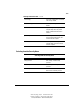
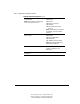
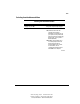
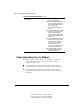
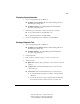
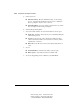
Table Of Contents
- Notice
- Contents
- About This Guide
- Getting Started
- Taking a Look at the Computer
- Using the Keyboard
- Managing Power
- Upgrading Your Computer
- Mobile Expansion Unit (available on select models)
- Using an Internal Modem (available on select models
- Using PC Cards
- Using Audio Features
- Using the Infrared Port
- Securing the Computer
- Intelligent Manageability
- Maintenance, Shipping, and and Travel
- Configuration and Diagnostic Utilities
- Troubleshooting
- Compaq Customer Support
- Regulatory Notices
- Electrostatic Discharge
- Specifications
- Index

14-4 Configuration and Diagnostic Utilities
Writer: Carey Gregg Project: Comments: 113733-001
File Name: O-CH14.doc Last Saved On: 4/1/99 3:28 PM
COMPAQ CONFIDENTIAL - NEED TO KNOW REQUIRED
Selecting from the Security Menu
Continued
Password options*
NOTE: Password options is selectable only
when a power-on password is set.
Enable/disable
■ QuickLock
■ QuickLock on Suspend
■ QuickBlank
■ Lock keyboard and mouse at
power-on
NOTE: To enable QuickLock on Suspend
or QuickBlank, you must first enable
QuickLock.
Device security* Enable/disable
■ Ports or diskette drives.
■ Diskette write.
■ CD-ROM or diskette startup.
NOTE: Settings for a DVD-ROM can be
entered in the CD-ROM field.
System IDs Enter identification numbers for the
computer, a docking base, and
battery packs.
*For more information about passwords, QuickLock, DriveLock, and disabling devices, refer
to Chapter 11.