
Information Tech projector user guide MP4800



5–2 Compaq iPAQ Microportable Projector MP4800 User’s Guide
Using the Remote Control
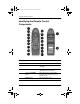
Identifying the Remote Control
Components
Identifying the Remote Control Components
Item Component Function
1
LED Glows green when the remote control is
operating
2
Mouse Ball Controls the on-screen cursor and
alternate left-mouse functions
3
System on/
Standby
button
Turns the projector on and off OR
powers the projector into and out of
Standby mode
4
Source
button Selects the input source
261794-001.bookPage2Tuesday,January22,20022:20PM