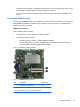
7. Remove the four screws that hold the drive in the drive cage.
Figure 7-10 Removing the Optical Drive Cage Screws
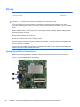
8. Lift the drive cage straight up and off the drive.
Figure 7-11 Removing the Optical Drive Cage
To install an optical drive, reverse the removal procedures.
Drives
89