
Installation Manual
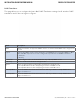


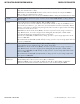

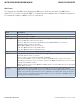
Table Of Contents
- About This Guide
- Overview
- Hardware Overview
- Ethernet Cables
- WEB Management
- Configuration by Web Browser
- About Web-based Management
- Basic Setting
- System Information
- Admin & Password
- Auth Method
- IP Setting
- HTTPS
- SSH
- LLDP
- Backup/Restore Configuration
- Firmware Update
- DHCP Server
- Port Setting
- Port Trunk
- LACP
- Redundancy
- MSTP
- STP
- VLAN
- VLAN Setting Example
- SNMP
- Traffic Prioritization
- Multicast
- Security
- AAA
- RADIUS Overview
- Warning
- System Warning
- Monitor and Diag
- Port Statistic
- System Log Information
- Cable Diagnostics
- SFP Monitor
- Ping
- Syncronization-PTP
- PoE Configuration
- Status
- Factory Defaults
- System Reboot
- Configuration by Web Browser
- Command Line Interface Management
- Technical Specifications

INS_CWGE26FX2TX24MSPOE_REV– 5 Mar 2014 PAGE 73
INSTALLATION AND OPERATION MANUAL CWGE26FX2TX24MSPOE
TECH SUPPORT: 1.888.678.9427
QoS Control List
This page allows to edit|insert a single QoS Control Entry at a time. A QCE consists of several
parameters. These parameters vary according to the frame type that you select.
Label Description
Port Members Check the checkbox button to include the port in the QCL entry. By default all ports
are included.
Key Parameters Key configuration is described as below:
Tag Value of Tag field can be ‘Any’, ‘Untag’ or ‘Tag’.
VID Valid value of VLAN ID can be any value in the range 1-4095 or ‘Any’; user can
enter either a specific value or a range of VIDs.
PCP Priority Code Point: Valid value PCP are specific(0, 1, 2, 3, 4, 5, 6, 7) or range(0-1,
2-3, 4-5, 6-7, 0-3, 4-7) or ‘Any’.
DEI Drop Eligible Indicator: Valid value of DEI can be any of values between 0, 1 or ‘Any’.
SMAC Source MAC address: 24 MS bits (OUI) or ‘Any’.
DMAC Type Destination MAC type: possible values are unicast(UC), multicast(MC),
broadcast(BC) or ‘Any’.
Frame Type Frame Type can have any of the following values:
1. Any
2. Ethernet
3. LLC
4. SNAP
5. IPv4
6. IPv6
Note: All frame types are explained below.
1. Any Allow all types of frames.
2. Ethernet Ethernet Type Valid Ethernet type can have a value within 0x600-0xFFFF or ‘Any’ but
excluding 0x800(IPv4) and 0x86DD(IPv6), default value is ‘Any’.