
Installation Manual

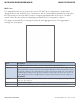

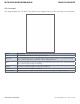
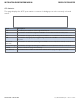

Table Of Contents
- About This Guide
- Overview
- Hardware Overview
- Ethernet Cables
- WEB Management
- Configuration by Web Browser
- About Web-based Management
- Basic Setting
- System Information
- Admin & Password
- Auth Method
- IP Setting
- HTTPS
- SSH
- LLDP
- Backup/Restore Configuration
- Firmware Update
- DHCP Server
- Port Setting
- Port Trunk
- LACP
- Redundancy
- MSTP
- STP
- VLAN
- VLAN Setting Example
- SNMP
- Traffic Prioritization
- Multicast
- Security
- AAA
- RADIUS Overview
- Warning
- System Warning
- Monitor and Diag
- Port Statistic
- System Log Information
- Cable Diagnostics
- SFP Monitor
- Ping
- Syncronization-PTP
- PoE Configuration
- Status
- Factory Defaults
- System Reboot
- Configuration by Web Browser
- Command Line Interface Management
- Technical Specifications

INS_CWGE26FX2TX24MSPOE_REV– 5 Mar 2014 PAGE 46
INSTALLATION AND OPERATION MANUAL CWGE26FX2TX24MSPOE
TECH SUPPORT: 1.888.678.9427
STP Statistics
This page displays the RSTP port statistics counters for bridge ports in the currently selected
switch.
Label Description
Port The switch port number of the logical RSTP port.
RSTP The number of RSTP Configuration BPDU’s received/transmitted on the port.
STP The number of legacy STP Configuration BPDU’s received/transmitted on the port.
TCN The number of (legacy) Topology Change Notification BPDU’s received/transmitted on
the port.
Discarded
Unknown
The number of unknown Spanning Tree BPDU’s received (and discarded) on the port.
Discarded Illegal The number of illegal Spanning Tree BPDU’s received (and discarded) on the port.
Refresh Click to refresh the page immediately.
Auto-Refresh Check this box to enable an automatic refresh of the page at regular intervals.