
Installation Manual




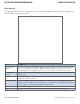
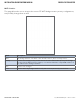
Table Of Contents
- About This Guide
- Overview
- Hardware Overview
- Ethernet Cables
- WEB Management
- Configuration by Web Browser
- About Web-based Management
- Basic Setting
- System Information
- Admin & Password
- Auth Method
- IP Setting
- HTTPS
- SSH
- LLDP
- Backup/Restore Configuration
- Firmware Update
- DHCP Server
- Port Setting
- Port Trunk
- LACP
- Redundancy
- MSTP
- STP
- VLAN
- VLAN Setting Example
- SNMP
- Traffic Prioritization
- Multicast
- Security
- AAA
- RADIUS Overview
- Warning
- System Warning
- Monitor and Diag
- Port Statistic
- System Log Information
- Cable Diagnostics
- SFP Monitor
- Ping
- Syncronization-PTP
- PoE Configuration
- Status
- Factory Defaults
- System Reboot
- Configuration by Web Browser
- Command Line Interface Management
- Technical Specifications

INS_CWGE26FX2TX24MSPOE_REV– 5 Mar 2014 PAGE 39
INSTALLATION AND OPERATION MANUAL CWGE26FX2TX24MSPOE
TECH SUPPORT: 1.888.678.9427
MSTI Mapping
This page allows the user to inspect the current STP MSTI bridge instance priority configurations,
and possibly change them as well.
Label Description
Configuration
Name
The name identifying the VLAN to MSTI mapping. Bridges must share the name and
revision (see below), as well as the VLAN-to-MSTI mapping configuration in order to
share spanning trees for MSTI’s. (Intra-region). The name is at most 32 characters.
Configuration
Revision
The revision of the MSTI configuration named above. This must be an integer between
0 and 65535.
MSTI The bridge instance. The CIST is not available for explicit mapping, as it will receive the
VLANs not explicitly mapped.
VLANS Mapped The list of VLAN’s mapped to the MSTI. The VLANs must be separated with comma
and/or space. A VLAN can only be mapped to one MSTI. An unused MSTI should just
be left empty. (I.e. not having any VLANs mapped to it.)
Save Click to save changes.
Reset Click to undo any changes made locally and revert to previously saved values.