
Instruction manual



Page 26 Coby Electronics Corporation
English
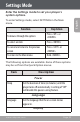
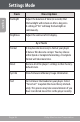
Item Description
Backlight Adjust the duration of time (in seconds) that
the backlight will remain on after a key press.
A setting of “On” will keep the backlight on
continuously.
Brightness Adjust the contrast of LCD display.
Sys Tools
Format It may become necessary to format your player
if data or les become corrupt. You may choose
either Quick or Complete formatting. A Complete
format will take more time.
Reset Restore all of the player's settings to their factory-
default state.
Sys Info View Firmware & Memory Usage information.
Sort Sort all music that loaded on your player. Select
“Force Sort” to update the music library immedi-
ately. This process may take several minutes if you
have transferred music les to the player recently.
Settings Mode