
User's Manual






Page 12
English
Basic Operation
Power
Your computer includes both an AC adapter and built-in, rechargeable
lithium-ion battery for maximum portability.
AC Power
Use the AC adapter to run your computer on AC power and charge the
battery. To connect the AC adapter:
Connect the power cord to the transformer pack.
Plug the power cord into an electrical outlet.
Connect the AC adapter to the AC power adapter jack of the com-
puter.
Battery Power
Make sure the battery is fully charged before first use. The battery
power status indicator will flash when the battery is low. Connect the
AC adapter as instructed above to charge the battery.
To replace the battery:
Shut down the computer and disconnect all cables, including the
AC power cord.
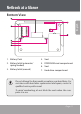
Turn the computer over to access the battery release. Slide the bat-
tery release latch to the unlock position and hold.
Pull out the battery.
Press the replacement battery into the compartment until it clicks
into place. Slide the release latch to the locked position.