
User's Manual


CHAPTER 3. USING YOUR COMPUTER
17
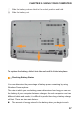
② Slide the battery release latch to the unlock position and hold.
③ Slide the battery out.
To replace the battery, slide it into the end until it clicks into place.
Checking Battery Status
You can determine the percentage of battery power remaining by using
Windows Power options.
The rate at which you use battery power determines how long you can use
the battery of your computer between charges. As each computer user has
different habits and needs, it is difficult to predict how long a battery charge
will last. There are two main factors:
The amount of energy stored in the battery when you begin to work.