
User's Manual







CHAPTER2. GETTING TO KNOW YOUR COMPUTER
11
CAUTION:
Lower the volume level before connecting headphones, then gradually
increase the volume for comfortable listening.
Hearing experts advise against the constant use of personal stereos played
at high volume.
Constant high-volume use can lead to hearing loss. If you experience
ringing in your ears or hearing loss, discontinue use immediately and
seek medical advice.
11
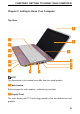
Microphone jack
Connects to a microphone or input signal for use with audio programs.
12
Click Button
Provide left- and right-click functions like those on a mouse.
13
Touch inductive panel
Provides the functionality of a mouse to move the cursor, drag or move
selected items, and left-click by tapping the surface.
14
System status indicators
The system status indicators show the current status of your computer.
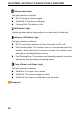
Power indicator light
The light operates as follows:
Solid Blue: The system is on.
Flashing Blue: The system is in standby mode.
Off: The system is off or in hibernate mode.