
User's Manual







CHAPTER2. GETTING TO KNOW YOUR COMPUTER
10
3
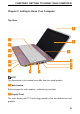
Power Button
Use the Power button to turn on the computer.
4
Built-in stereo speakers
5
AC adapter connector
Connects to the AC adapter to power on the computer and charge the
battery when the computer is not in use.
CAUTION:
To prevent damage to the computer and battery pack, use the dedicated AC
adapter only.
6
LAN Connector
If you are using a cabled network signal, this connects your computer to a
network or broadband device.
7
VGA Connector
Connect to a monitor or projector.
8
USB 2.0 connectors
Connect to USB devices, such as a mouse, keyboard, printer, external drive,
or MP3 player.
9
Multi-Media Reader Slot
Provides a fast and convenient way to view and share digital photos, music,
videos, and documents stored on the following digital memory cards:
SD, MMC, MS/MS pro
10
Headphone jack
Connects to a pair of headphones, or sends audio to a powered speaker or
sound system.