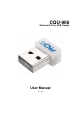
User manual
Manuals
Brands
CNET Manuals
computer components
CQU-906
1
2
3
4
5
6
7
8
9
10
9
4.
The
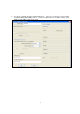
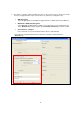
wireless Network Properties window will pop up.
I
f the access point you selected enables
encryption (WEP
, WP
A
, WP
A2, and etc…
), please setup the
wireless securities settings. If not,
simply click the “
OK
” to and skip to step 6
1
...
...
7
8
9
10
11
...
...
25