8
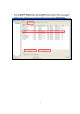
3. Go to the “Available Network” page, and click “Refresh” if your preferred wireless access point
is not shown here. After the Scan results displayed, select the wireless access point with the
SSID (the name of wireless access point) you want to connect and click “Add to Profile”