
User manual



7
Chapter 3. Configuring Your Wireless Network
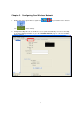
1. Double click on the green wireless signal icon in your taskbar or the shortcut
icon
on the desktop.
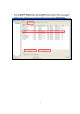
2. Configuration utility will scan for all wireless access points automatically. You can use the utility
to check the linking information or go to the “Available Network” page to search for available
wireless network