
User manual


24
Appendix 1. Troubleshooting
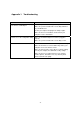
PROBLEM CORRECTIVE ACTION
None of the LEDs turn on when I plug
in the wireless USB adapter.
Make sure you have turned on your computer
Make sure you have installed the correct utility and driver
for your WLAN card.
Restart your computer and plug in the adapter again.
Make sure there is no hardware conflict. Check your
computer resource information.
I cannot access the configuration utility Make sure the WLAN adapter is installed / plugged in
properly.
Make sure you have installed the correct utility version.
I cannot connect to a wireless network Make sure the ACT LED on the WLAN adapter is blinking.
Make sure the wireless router is within range. Move your
computer closer to the wireless router.
Make sure that you have set the wireless network settings
correctly. For example, the SSID and security settings.
Make sure there is no radio interference (for example,
cordless phones, microwave oven, etc) that may affect
wireless transmission quality.