
User manual



10
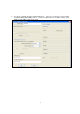
5. The wireless securities setting should be the same as the connected access point. You should
check the encryption details of your connected access point before setting this setup.
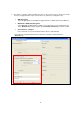
WEP Encryption
Select the appropriate level of WEP encryption, 64-Bit or 128-Bit and enter the WEP key
WPA-PSK or WPA2-PSK Encryption
Select WPA-PSK or WPA2-PSK according to your connected access point. Enter the key
in the “Network Key” and type again in the “Confirmed network key” to double confirm.
802.1x wireless configure
If the connected access point enable the 802.1x wireless authentication
Please fill in the required information, then click “OK” to finish the setting and back to
“General” page