
User`s guide





C-Touch Colour Touch Screen
5.1 Configuration Page
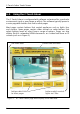
The C-Touch Colour software includes a configuration page, such as the
one in . This allows you to customise your unit. The configuration
page may have a different name, such as Tools, Utilities, Setup, Settings or
System.
Figure 4
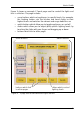
Depending on your installation, the configuration page may allow you to:
• set or change the time and date
• change the region or language
• temporarily ignore screen presses (Cleaning Mode)
• adjust sound settings
• adjust the backlight
• set or change a password
• calibrate the screen
• configure the unit’s networking settings.
Figure 4 – An example configuration page
10