
User manual
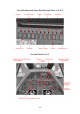

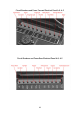


So let's dial some radio frequencies (Figure 2 and 3):
Figure 2 shows two square rectangles over the dial. These indicate where the mouse
rectangles are located. As you hold your mouse over it it should show the selected radio's
active frequency as shown in figure 3. Scrolling the mouse wheel changes the frequency.
The left mouse rectangle dials the Megahertz Band, the right rectangle dials the Kilohertz
Band.
Item 2 is a two-position switch that selects which Radio is active on the dial:
Position 1 : COM 1 Radio is selected
Position 2 : COM 2 Radio is selected
Fig. 2
Fig. 3
30