
User manual



Radio Operation Fw 190 A-3
The Fw 190 A-3 was equipped with the FuG VII radio giving the pilot the mere option to turn
the radio on/off and to adjust the loudness.
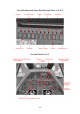
To give you a few more options from within the 3d virtual cockpit we have adopted the
remote controls as follows:
The Master Switch acts as the avionics master and COM selector:
Position #1: Avionics Off
Position #2: COM 1 is active
Position #3: COM 2 is active
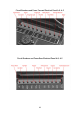
The volume knob acts as the frequency dialer .It shows two square rectangles indicating
where the mouse rectangles are located. As you hold your mouse over it it should show
the selected radio's active frequency as shown in the image below. Scrolling the mouse
wheel changes the frequency.
The left mouse rectangle dials the Megahertz Band, the right rectangle dials the Kilohertz
Band.
The Fw 190 A-3 does not support standby frequencies.
28