
User manual


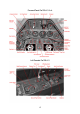


The Cockpit
This is a fairly well structured and logically arranged office. Almost everything is driven
and controlled electrically. The pilot’s workload is reduced to the absolute minimum
thanks to the so called “Kommandogerät”, a kind of early analogue computer based on
barometric conditions and throttle position, which controls all engine and propeller related
tasks such as setting spark points, mixture, prop pitch, engine gear and rpm just by
working the throttle.
Operating the FS Aircraft
First, the aircraft in it's default configuration can be started with CTRL+E if you choose so
but you won't get very far if you leave it at that. The aircraft systems require some attention
in order to work correctly, Fuel should be burned in the correct sequence if you don't want
to end your flight prematurely with 100 gallons of unusable fuel, the altimeter's operational
limits should be taken serious and the engine deserves some special care.
But fear not, we have prepared two options for your convenience to get the most out of
your Fw 190 flying experience:
– This handbook and the in-flight check-lists. Read it carefully to familiarize yourself
with the ins and outs of the Butcherbird systems. There are no bogus procedures
or fake functions described in this document.
– The “Just Fly” utility. Accessible from the Start Menu – Classics Hangar folder. This
tool allows you to bypass our custom failure modelling and also simplifies the fuel
scheme so that a fuel management via the fuel pumps is no longer required.
There is no old style 2d panel included.
The virtual 3d cockpit is fully functional and it’s visual quality should satisfy even the most
critical FS addict. All gauges and instruments are entirely modelled in 3d. The textures are
created using the latest industry standard rendering technologies, giving a depth and
sense of “being in the cockpit”. The aircraft can be entirely operated with the mouse from
within the virtual cockpit. Different camera configurations can be accessed by pressing the
“A” key so that every button and switch is easily in reach.
In the following we will discuss the technical/procedural details of operating some specific
cockpit systems in the aircraft.
Detailed start-up and flying procedures can be gathered from the in-flight check-lists and
references.
All gauges are in metric units, the labels are naturally in German language. However, to
serve an international audience, all buttons, levers, gauges and labels show an English
language tool tip when holding the mouse over them. All flight and engine gauges display
a tool tip in international units.
Farther on in the handbook is a description of the most important gauges which also
includes an “over the thump” Metric/International unit conversion so that the international
user should become accustomed to the metric system fairly fast.
Most systems are operated straight forward, however the radio, fuel usage, gear, trim and
flap operation may require a closer look and some practice to getting used to. This is
explained farther on in this document.
15