
Mlultimedia Station Owner's Manual & Installation Manual




Functions of Remote Control Unit Buttons
17
MAX678RVD
English
Owner’s manual
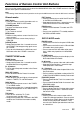
[RPT] button
• Press to perform track repeat.
• Keep pressing more than 1 second to perform
disc repeat.
[RDM] button
• Press to play tracks of all discs at random.
• Keep pressing more than 1 second to play
folders of all discs at random.
When SUB zone is selected
SUB zone operations are supported, but button
functions are limited as follows:
Shared modes
[VOLUME] buttons
• Controls sound volume for MAIN zone source.
[MUTE] button
• Controls audio mute function for MAIN zone
source.
[TA] button
Not supported.
CD changer mode
• This mode is disabled when MAIN zone is set
to an external equipment other than the CD
changer.