
Owner`s manual






Inserting the Battery
ill
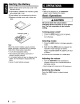
Slide remote control unit's rear cover
in
the
direction shown.
® Insert battery (CR2025) into insertion guides
with printed side
(+) up.
@ Press battery into compartment as shown.
@ Replace and slide cover until it clicks into
place.
Insertion guide
Notes:
Misuse may result
in
battery rupture
and
fluid
leakage, resulting
in
personal injury
or
damage.
Always follow these safety precautions:
• Use only the designated battery.
•
When
replacing the battery, insert with
+/-
polarities correctly oriented.
• Do not subject battery
to
heat,
or
dispose
in
fire
or water. Do not attempt to disassemble the
battery.
• Dispose
of
used batteries properly.
6.
OPERATIONS
Note:
• Refer to the diagrams in
"3. CONTROLS"
(page
5) when reading this chapter.
Basic Operations
·ACAUTION
Be sure
to
lower
the
volume before
switching
off
the
unit
power
or
car's ignition
key. The
unit
remembers its last volume
setting.
Turning
power
on/off
1.
Press the [SRC] button to turn on power.
2.
Press and hold the [SRC] button
(1
sec.) to
turn off power.
Selecting modes
1.
Press the [SRC] button to change operation
mode.
2.
Each time the [SRC] button is pressed, the
operation mode changes as follows:
Radio
~
CD/MP3IWMA
~
USB/iPod
~
AUX
~
Radio
...
An
iPod can be connected via a USB cable.
Adjusting the volume
1.
Turn the [ROTARY] knob clockwise to
increase volume; turn counterclockwise to
decrease volume.
* Volume range
is
0 (minimum)
to
33
(maximum).
Switching the display
Press the [DISP] button to select desired
display.
8
CZ209