
Owner`s manual






4.
DCP
(DETACHABLE
CONTROL
PANEL)
Main Unit Front
ACAtJ'TION
DCP
connector
•
After
removal, be careful
not
to
drop
the
DCP
or
subject
it
to
strong impacts,
to
prevent damage.
• Once the [RELEASE] button
is
pressed
and the
DCP
is
unlocked, car
vibrations
can cause the DCP
to
fall.
• The connector
for
the main
unit
and
DCP
is extremely important. Be careful
not
to
damage
it
by pressing with fingernails
or
sharp objects.
Note:
•
If
the DCP is dirty, wipe off with a soft,
dry
cloth
only.
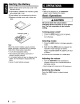
Removing the DCP
1.
Press and hold the [SRC] button
(1
sec.) to
switch off power.
2.
Press the [RELEASE] button.
*
DCP
is
unlocked.
3.
Remove DCP.
Attaching the DCP
1.
Insert the right end of DCP into main unit.
2.
Press left end of DCP into main unit.
6
CZ209