
Owner`s manual






Names
of
the
Buttons and
Their
Main
Functions
3.
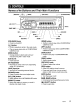
CONTROLS
[~]
(EJECT)
--:-.;;.-.,:..
[RELEASE]=j;[
::]~~ND]
_f-=[C=D=S=L=O=T]====p;;.\;;;;;==t::\[IR RECEIVER]
@~
7~
0
~
o
[AUX]
[j.llI~],
[~]---;"-':l
~
7
r
-
~1J'
~~\
J-
~
J
[SRC]
==
[DISP]J=~~====
[SOUND]
[SCN]
[UP]
[ISR]
[RPT]
[ON]
[ROTARY]
[ROM]
[DIRECT]
[RELEASE] button [ROM] button
• Press to unlock DCP. • Perform random play while
in
CD/MP3/wMAI
[~~I~]
button USB/iPod mode.
• Perform preset scan while
in
the radio mode. [RPT] button
• Play or pause a track while
in
CD/MP3/wMAI • Perform repeat play while
in
CD/MP3/wMAI
USB/iPod mode. USB/iPod mode.
[BND] button [SCN] button
• Change bands, or select seek tuning or • Perform scan play
in
CD/MP3/wMAlUSB
manual tuning while
in
radio mode. mode.
[CD SLOT] [DISP] button
• Insert CDs here. • Switch display mode.
[IR
RECEIVER] [ROTARY] knob
• Receiver for remote control unit. (Operating • Rotate to adjust the volume.
range: 30° all directions)
[ISR] button
[AU
X]
input jack • RecalliSR station stored
in
memory.
• Input jack for connecting external device. • Press and hold
(2
sec.) to store current
[SOUND] button station
in
ISR memory (radio mode only).
• Press to switch to the sound adjust mode.
[SRC] button
[UP],
[ON]
buttons • Turn the power on/off.
• Select folders while
in
MP3/wMAlUSB mode.
[~],
[~]
buttons
[DIRECT] buttons •
Commence fast-forward/fast-reverse mode.
• Store radio stations
in
memory or recall it
[~]
(EJECT) button
directly while
in
radio mode. • Press to eject disc.
CZ209 5