
Owner`s manual


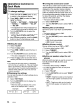



Selecting category
using
preset
memory
1. Press the [BND] button to select the iPod
menu mode.
The category can be set as follows in the
[DIRECT] (1-6) buttons.
[1] : PLAYLiST
[2]:
ARTIST
[3]:
ALBUM
[4]:
SONG
[5]:
GENRE
[6] : COMPOSER
2. Press the desired [DIRECT] (1-6) button to
select the category.
*Subfolders may
be
displayed, depending
on
the category.
In
this case,
use
the [ROTARY] knob to switch
between subfolders
and
use the
[~]
button
to select the desired subfolder.
3.
When the track name display is showing,
press the
[~]
button.
Playback will begin from the first track in the
selected category, and the iPod menu mode
will be canceled.
*
Use
the
[ROTARY]
knob to select a track
within a category.
About title
display
This unit supports the display of title information
obtained from a connected iPod.
• Character code information is UTF-8;
displayable characters include English
alphanumerics, some symbols, and some
umlaut characters.
• Unsupported characters will be replaced by
asterisks (*).
CZ209 19