
User's Manual





ClarIDy HF RFID Reader
16/19 © Copyright 2008 ClarIDy Solutions, Inc. All rights reserved.
Read Block Data
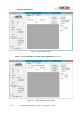
After the Tag UID is identified, you can click the “Read All” button to retrieve all block data in
the tag’s memory, see figure 16. If the system pops up the dialog as figure 17, suppose the tag
information could not be accessed properly, enter the “Block Count” such as 27, and “Size
(Bytes)” such as 4 for the ISO 15693 tag and click “Read All” again. If the error message still
occurred, reduce the “Block Count” and try again.
Figure 16. Block Data Control (Read All)
Figure 17. Read all block data from the tag’s memory.