
User guide


Using Your WIP310
Using Keypad Options
Cisco WIP310 User Guide 57
3
Using Keypad Options
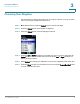
You can lock or mute your phone keypad.
Locking the Keypad
This selection allows you to temporarily lock the phone buttons and keypad. When
the phone is locked, pressing phone keys and buttons has no effect. To enable key
lock:
STEP 1 When the phone is in the Home screen, press the Options soft key. Press the Up or
Down Arrow key to navigate to
Key Lock
.
STEP 2 Press the Select button to enable Key Lock. A lock icon appears at the bottom
center of the screen and the phone returns to the Home screen.
To r e m o v e t h e K e y L o c k :
STEP 1 Press the Select button (the lock icon displays above this key).
STEP 2 Press the asterisk (*) button on the keypad.
Muting the Keypad
You can turn the phone keypad off so that no tones are played when phone keys
and buttons are pressed. To mute the phone keypad:
STEP 1 In the Home screen, press the Select button to choose Settings. Press the Select
button and navigate to
Call Preferences
.