
User guide


Using Your WIP310
Blocking Anonymous Calls
Cisco WIP310 User Guide 51
3
To configure call waiting:
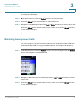
STEP 1 In the Home screen, press the Select button to choose Settings.
STEP 2 Press the Select button and navigate to
Call Preferences.
STEP 3 Navigate to
Call Waiting
and press the Left or Right Arrow key to select
ON
or
OFF
.
Press the Select button (check mark icon) to confirm or press the Cancel soft key
to exit without changes.
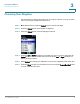
Blocking Anonymous Calls
You can configure your phone to block calls from an unidentified caller. Calls from
unidentified callers will not ring your WIP310 phone. To configure call blocking:
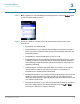
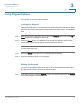
STEP 1 In the Home screen, press the Select button to choose
Settings
. Press the Select
button and navigate to
Call Preferences
.
STEP 2 Navigate to
Block Anonymous Calls
and press the Left or Right Arrow key to select
ON
or
OFF
.
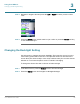
STEP 3 Press the Select button (check mark icon) to confirm or press the Cancel soft key
to exit without changes.