
User guide




Installing the WIP310
Accessing the Wireless Network
Cisco WIP310 User Guide 37
2
Editing a Wireless Profile
To edit a profile:
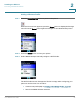
STEP 1 In the Wireless Setup > Manual Setup screen, press Options and choose
Edit
Profile
.
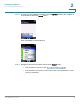
STEP 2 Scroll to the field you want to edit. Make the desired changes and press the Select
button.
Deleting a Wireless Profile
!
CAUTION You are not asked to confirm you want to delete the profile, so be sure you want to
delete it before proceeding.
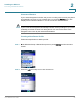
In the Wireless Setup > Manual Setup screen, press Options and choose
Delete
Profile
.
Switching Between Wireless Profiles
You can configure multiple wireless profiles on your WIP310. If you have more than
one wireless profile saved on your phone, the phone tries to contact the first
wireless router in the list upon startup. Therefore, you should first configure the
wireless profile for the location where you use the phone the most.