
User guide




Installing the WIP310
Accessing the Wireless Network
Cisco WIP310 User Guide 34
2
Unsecured Routers
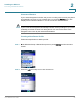
If your network appears in the list, and you are not using router security, the phone
automatically connects to your network after you press the Select button. The
display screen indicates whether or not the connection was successful.
NOTE If your router did not appear automatically in the list, security settings on your router
probably prevented its name from being shown. You need to know the name
assigned to the router by the network administrator.
Creating a New Router Profile
Follow the steps below to add the profile:
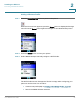
STEP 1 In the Wireless Setup > Manual Setup screen, press Options and choose
New
Profile
.
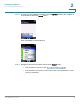
STEP 2 Press the Left Arrow key to turn
Auto Connect
on.