
User guide




Installing the WIP310
Accessing the Wireless Network
Cisco WIP310 User Guide 29
2
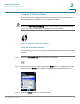
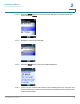
STEP 7 If required, enter the user name and password. (By default, Linksys routers
typically use “admin” for the user name and “admin” for the password.)
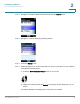
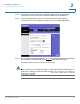
STEP 8 View the Wireless tab or screen. Locate the Wireless Protected Setup
configuration menu. The following example is from the Linksys WRT160N:
STEP 9 Enter the PIN into the field that allows you to setup wireless devices using a PIN. (In
the example for the WRT160N, press Register after entering the PIN.)
A message appears if the connection is successful.
NOTE If the connection is successful, the phone creates a Wi-Fi Profile automatically. To
view, edit, or manage your Wi-Fi Profiles, see Manually Configuring Your Wireless
Connection, page 30.